
Turn Your Business Into Connected Systems.
Build the right technology foundation, connect your business tools, and simplify workflows with digital solutions designed to improve efficiency and support growth.
Build Digital Solutions
Connect Your Systems
Automate Workflows
Build Digital Solutions
Connect Business Systems
Automate Workflows
Improve Operational Efficiency
Automate repetitive work.Build your AI automation workflow engine.
Connect your business tools, automate repetitive tasks, and create reliable workflows that help your business operate faster and more efficiently.
Workflow Engine
Connect tools. Automate tasks. Work smarter.


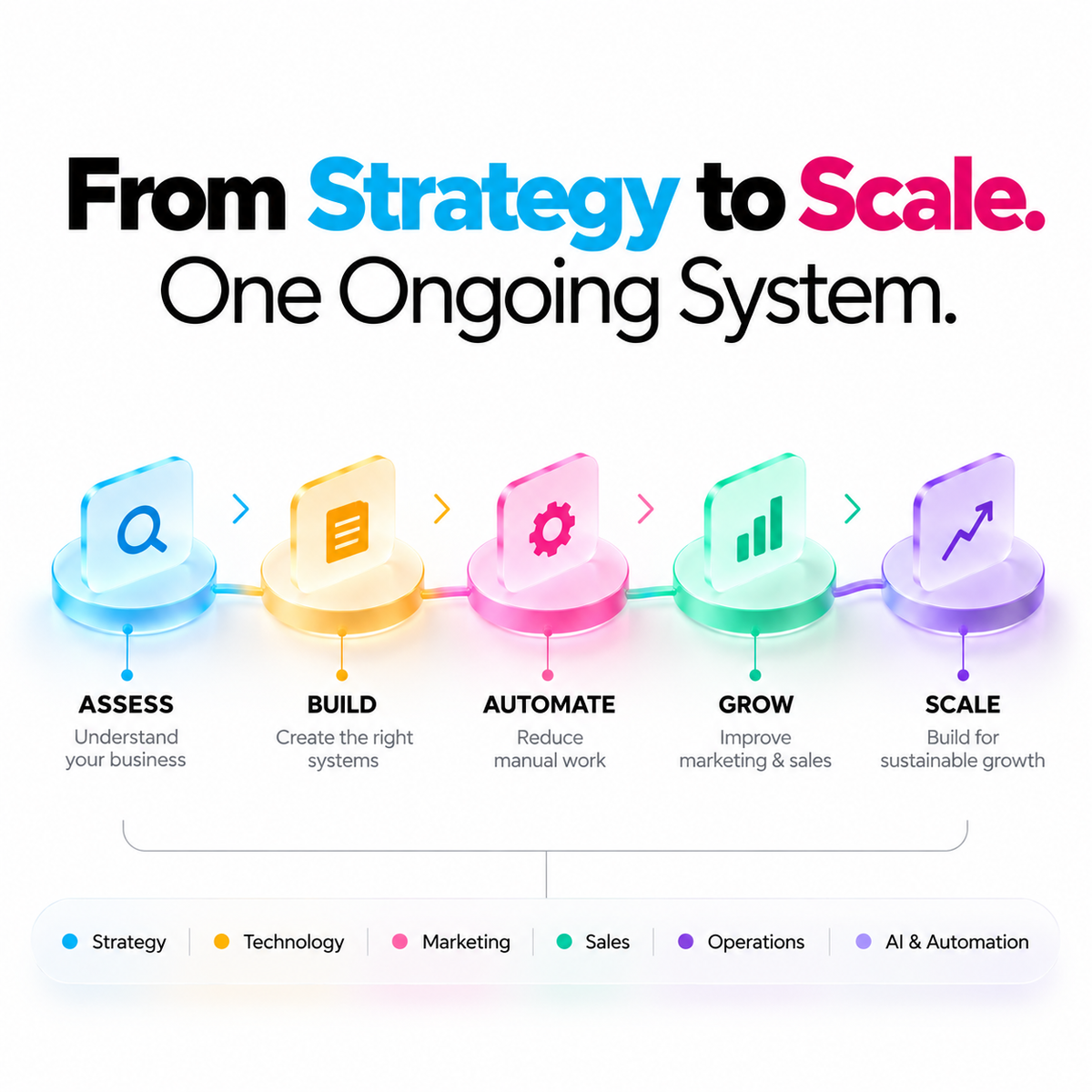
Everything Your Business Needs to Scale
One integrated system to streamline operations, strengthen your strategy, and turn business potential into predictable, scalable growth.
Strategic Clarity
Smarter Operations
Smarter Operations
Client Success Stories

Makeup Academy Case Study
Makeup Academy Case Study


Information & Technology FAQs
Find answers about business technology, digital solutions, system integration, cybersecurity, automation, and choosing the right technology support for your business.
What does information and technology mean for a business?
Business information technology includes the digital tools, software, infrastructure, and systems a company uses to manage information and run its daily work. This may include websites, cloud platforms, business applications, data systems, and communication tools.
The right technology should solve specific business problems, support your team's work, and make operations more reliable rather than adding unnecessary complexity.
How do I know which technology my business needs?
Start by identifying the work that is slow, error-prone, difficult to track, or dependent on manual effort. Review your current tools, business goals, team needs, budget, and the systems you already use.
Prioritise solutions that address a clear problem and can be adopted by your team. A technology audit can help identify what to keep, improve, replace, or connect.
Does a small business need custom software?
Not always. Existing software or low-code tools may cover common needs such as customer management, accounting, project tracking, and communication. Custom development becomes useful when standard tools cannot support an important workflow or requirement.
Compare the total cost, flexibility, integrations, maintenance, and expected business value before deciding to build a custom solution.
What is a digital transformation project?
Digital transformation uses technology to improve how a business works, serves customers, manages information, and makes decisions. It can include modernising systems, digitising processes, connecting data, and introducing automation.
Effective projects begin with measurable goals and a practical implementation plan, including team adoption, data quality, costs, and ongoing support.
What is system integration?
System integration connects software and business tools so that information can move between them with less duplicate entry and fewer disconnected processes. Examples include linking a website with a CRM, connecting inventory with sales channels, or sending form leads into a sales system.
The right approach depends on the platforms, available APIs, data structure, permissions, and how reliably information needs to sync.
Can my existing business software work together?
Often, yes. Many platforms provide native integrations, APIs, or approved connectors. The first step is to check whether your tools support the required data fields, events, and workflows.
Before connecting systems, map the information flow, decide which system is the source of truth, and test errors, duplicate records, and failed synchronisation.
Should I choose cloud software or an on-premises system?
Cloud software is typically accessed online and may reduce the need to manage local infrastructure. On-premises systems offer more direct control over the hosting environment but usually require internal or specialist support.
Evaluate security, compliance, internet reliability, integration needs, scalability, availability, backup arrangements, and total cost before choosing.
How can I migrate business data to a new system?
A migration usually involves reviewing and cleaning existing data, mapping fields, backing up records, testing a sample transfer, validating the results, and planning the final cutover.
Set access controls and a recovery plan before the migration. The process should also account for downtime, integrations, user training, and any records that must be retained.
How can I improve the security of my business technology?
Start with multi-factor authentication, strong unique passwords, least-privilege access, timely software updates, secure backups, and staff awareness. Review who can access important systems and remove access when it is no longer required.
Security needs vary by business and the data it handles. A risk assessment can help determine which controls and specialist support are appropriate.
Why are backups and disaster recovery important?
Backups help restore data after accidental deletion, hardware failure, cyber incidents, or other disruptions. Disaster recovery planning defines how critical systems and operations will be restored.
Keep protected copies separate from everyday systems and test restoration regularly. A backup is only useful if the data can be recovered within the time your business can tolerate.
How do I make sure a website or business system stays reliable?
Reliability depends on suitable hosting, maintenance, monitoring, security updates, backups, performance checks, and a clear process for handling incidents. Critical systems may also need uptime monitoring and documented recovery procedures.
Define what availability means for your business and review recurring errors, response times, and support arrangements rather than waiting for a major outage.
How often should business technology be reviewed?
Review critical systems regularly and whenever your business changes significantly, such as adding locations, expanding teams, changing platforms, or handling more sensitive data.
Check security, licensing, performance, integrations, costs, user feedback, and whether each tool still supports your goals. The review frequency should reflect the system's importance and risk.
What business processes can be automated?
Common candidates include lead capture, task assignments, appointment reminders, report generation, invoice notifications, customer follow-ups, and moving information between connected tools.
Start with a repeatable process that has clear rules and measurable outcomes. Document exceptions and keep a human review step wherever mistakes could materially affect customers or business decisions.
How can AI help my business operations?
AI tools can assist with tasks such as summarising information, classifying enquiries, drafting content, searching internal knowledge, and supporting analysis. The appropriate use depends on the quality of the data and the consequences of an incorrect output.
Protect confidential information, verify important outputs, and define when human approval is required before using AI in business workflows.
Will automation replace my existing software?
Usually, automation connects or coordinates existing tools rather than replacing them. It can pass data between systems, trigger actions when conditions are met, and reduce repetitive manual work.
Replacement may be worth considering if a system cannot support essential needs, but compare migration effort, disruption, costs, and integration options first.
How do I measure the value of automation?
Measure time saved, error rates, processing speed, service quality, completion rates, and the ongoing cost of maintaining the workflow. Compare results with a baseline taken before implementation.
Include setup, subscriptions, monitoring, exception handling, and staff training in the calculation. Automating a process is worthwhile when the measurable benefits justify its total cost and risks.
What information should I prepare before a technology project?
Prepare your business goals, current tools and systems, key workflows, user needs, known pain points, data requirements, budget, and any deadlines or compliance constraints.
Identify who will make decisions and who will use the solution. Share only the access and business data needed for the project, using secure methods wherever possible.
How much does a business technology solution cost?
Cost depends on the scope, existing systems, integrations, data migration, customisation, security requirements, training, and ongoing maintenance. A configuration of existing software usually differs in cost from a custom-built platform.
Consider the total cost of ownership, including subscriptions, hosting, third-party tools, support, and future changes. Confirm the deliverables and exclusions before work begins.
Can Udyog Connect assess my current technology setup?
Udyog Connect can help businesses review their digital tools, workflows, technology gaps, and opportunities to improve how systems support operations and growth. The appropriate scope depends on the selected service and your business requirements.
A useful assessment should identify priorities, practical recommendations, dependencies, and next steps based on your current setup and goals.
How do I choose the right Information & Technology service?
Start with the problem you need to solve: selecting software, connecting systems, improving reliability, strengthening security, developing a digital solution, or automating a workflow.
Review each service's scope, deliverables, timeline, pricing, required inputs, and ongoing support. If several areas need attention, prioritise the highest-impact issue first.
Build a Business That’s Ready for What’s Next.
Bring strategy, technology, marketing and operations together to create a clearer path to sustainable growth.